Welcome to Cyber Hygiene, my weekly newsletter, where I share tips and actionable data to help everyone stay safe online.
😊 What Does “Getting Hacked” Mean?
“Getting hacked” is a broad, non-technical way of saying that someone gained unauthorized access to your digital accounts, devices, or data, or tricked you into giving away credentials, money, or personal information.
There is an important difference between a malfunction and an actual hack:
Malfunction, bug, or performance issue Your device or app stops working because of software problems, hardware issues, or configuration errors. You might see crashes, freezes, or data loss, but no one has accessed or misused your information.
Hacking, compromise, or social engineering An external actor intentionally exploits a vulnerability, steals your credentials, infects your device, or manipulates you into taking an action. Examples include phishing, SIM swaps, malware infections, and account takeovers. In these cases, someone with intent and capability is actively involved.
This distinction matters when you ask for help. Use clear language such as “This is a malfunction” or “My account or device was compromised by an unknown third party.”
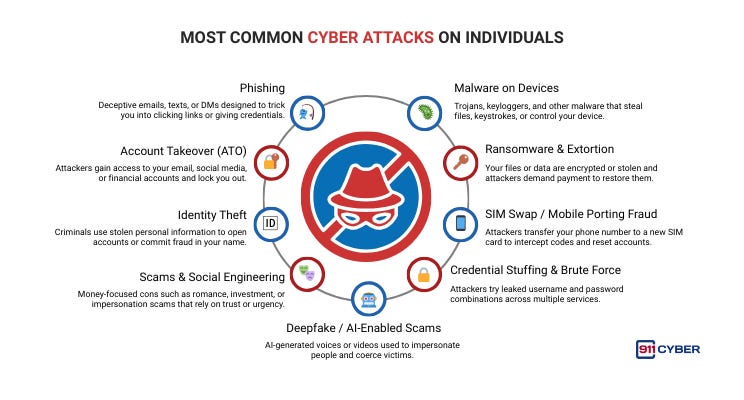
📌Most Common Cyber Attacks on Individuals
⚠️ Why You Should Care?
Getting hacked is not just an abstract risk. It can have real consequences that affect nearly every aspect of your life. Your personal information, financial assets, reputation, and digital presence are all vulnerable. Hackers can steal your identity to open accounts or take out loans in your name, drain your bank or payment accounts, lock your files with ransomware, or use your social media and email accounts to target friends, family, or colleagues.
Even seemingly minor breaches, such as a compromised email or password, can quickly grow into larger problems. For example, a hacker gaining access to a single account can use it to reset passwords on other accounts, bypass security measures, or spread malware to your contacts.
Being informed and prepared is your best defense. By recognizing common threats, implementing strong security practices, and knowing how to respond when something goes wrong, you can act quickly, limit the damage, and regain control of your digital life before a small incident becomes a major crisis.
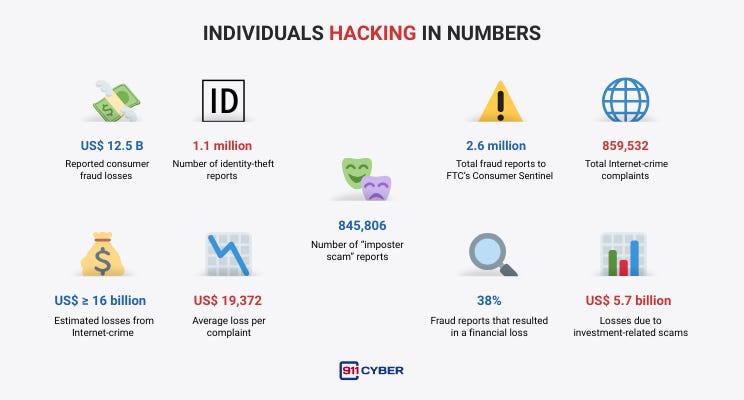
📊 Individuals Hacking in Numbers
🤖 Will It Get Worse?
Short answer: very likely yes, at least in the short term.
The volume and sophistication of phishing and scam content have increased. Industry reports show that AI is already being used to scale and perfect phishing, social engineering, and deepfake extortion. Microsoft, APWG, and other organizations have documented AI-assisted attacks and deepfake scams. The FBI has warned about AI-enabled virtual kidnapping and convincingly fabricated audio and video used in fraud.
Defenders also use AI for threat detection, triage, and fraud blocking. The landscape has become an arms race: attackers create more convincing attacks while defenders develop better detection tools. AI gives attackers a near-term advantage because it makes realistic targeting and messages cheap and fast to produce. Expect more targeted scams, faster credential stuffing campaigns, and more convincing voice and video cons.
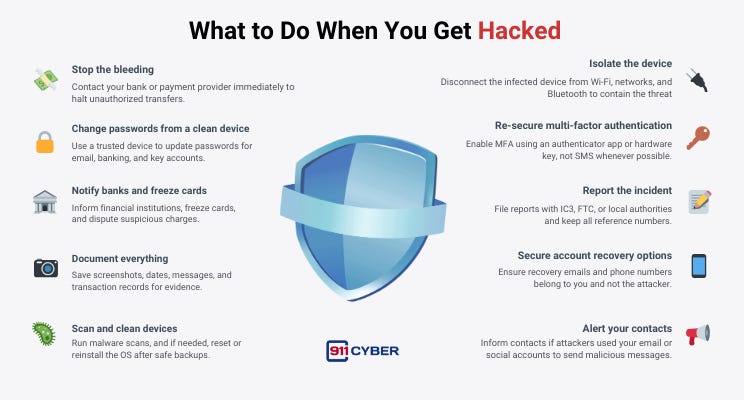
🛡️ What to Do When You Get Hacked
❓ Other Questions People Are Asking
If I get hacked, should I pay the ransom? Paying doesn’t guarantee recovery, encourages attackers, and may violate local rules in some cases. First consult law enforcement and cyber specialists; document everything.
How long until I know everything is clean? There’s no universal time. After wiping/reinstalling and changing credentials, monitor for unusual activity for months. Consider professional triage for complex cases.
Do I need to report minor losses? Yes, reporting to IC3/FTC helps law enforcement connect cases and improves overall response; some banks require a police/official report for reimbursement.
Is MFA safe? Won’t attackers bypass it? MFA greatly reduces risk. Authenticator apps or hardware keys (FIDO2/WebAuthn) are stronger than SMS and should be used when available.
My kid’s social account was hacked, what should I do? Reclaim and secure the account, change passwords, enable MFA, warn contacts, and remove any third-party apps. If the attack targeted family info, consider identity monitoring.
Report scams here: https://911cyber.app/report-cyber-incident/

🧰 What Resources Are Available to Help?
📚Books
Hacked: The Secrets Behind Cyber Attacks by Dr Jessica Barker
Cyber Security by Hacking Studios
🎙️ Podcasts
What the Hack? With Beau Friedlander on Delete Me
Ep 69: Human Hacker with Christopher Hadnagy on Darknet Diaries
Do This If Your Being Hacked | Ex-NSA Hacker Kyle Hanslovan by The Reed Mornin Show
▶️ Videos
What to do if you are hacked: Full Guide by PC Security Channel
🛠️ Tools
Authenticator apps: Microsoft Authenticator, Google Authenticator, Authy.
Password managers: 1Password, Bitwarden (choose one and use strong unique passwords).
Antivirus & endpoint tools: Malwarebytes, Windows Defender (built-in), Bitdefender.
Credit monitoring / freeze:
Reporting & official help:
IC3 (FBI): https://www.ic3.gov
FTC IdentityTheft: https://www.identitytheft.gov
911Cyber : https://911cyber.app/report-cyber-incident/
💡 Final Thoughts
Getting hacked feels personal, and it is. Attackers target your trust, urgency, and digital routines. The good news is that the most effective actions are practical and achievable. Isolate your devices, change passwords from a clean device, enable strong multi-factor authentication, notify your banks, and report incidents to authorities. AI will make attacks more convincing, but it will also power better defense tools. Your best defense remains layered: use strong, unique passwords, enable MFA, keep devices up to date, and approach unexpected messages or requests with healthy skepticism. Slow down, verify, and stay in control.
