
Welcome to Cyber Hygiene, my weekly newsletter, where I share tips and actionable data to help everyone stay safe online.
🔍 What is a Web Browser?
Every day, billions of people open a browser without thinking twice about it. Chrome, Safari, Edge, and Firefox have become so ordinary that we forget just how powerful they really are.
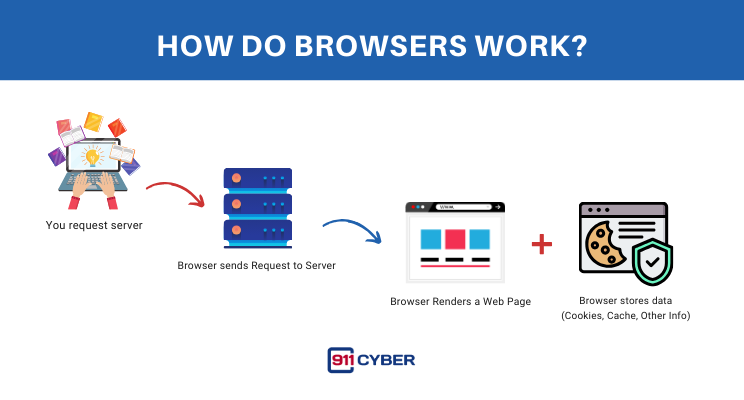
So, what is a browser? At its core, a web browser is the software that lets you access and interact with the internet. It takes the code behind websites and turns it into the pages you read, the videos you watch, and the apps you use. In short, it’s your main gateway to the digital world.
But browsers are not only passive windows into the web. They are also active collectors of your data. They know your habits, your searches, your locations, your passwords, and sometimes even the details you type into forms. That makes them both incredibly useful and incredibly risky.
⚙️ How Do Browsers Work?
⚠️ Why Do They Matter?
Browsers are the most used application in the world, the entry point to work, banking, shopping, health, and social life.
Whoever controls your browser has incredible insight into your behavior, preferences, and identity.
They are becoming AI battlegrounds: Perplexity’s bid for Chrome and OpenAI’s AI-powered browser show how valuable your browsing data is.
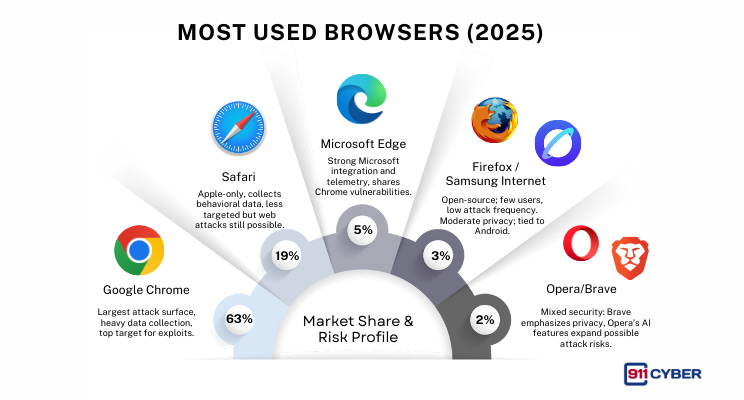
📊 Most Used Browsers (2025) – Market Share & Risk Profile
🔐 Security & Privacy Risks of Browsers
Tracking & Profiling : Every click can be logged for advertising or data mining.
Credential Theft: Auto-fill and saved passwords are prime hacker targets.
Malicious Extensions: Fake or over-permissive add-ons can spy on you.
Phishing & Drive-by Downloads: Browsers are the delivery channel for scams and malware.
Fingerprinting: Even in “incognito,” your device can be uniquely identified.
Shared Device Risks: Browsers often keep histories, cookies, and tokens behind after log-out.
🤖 How AI is Making Things Worse
AI-powered browsers can act on your behalf: filling forms, clicking links, and integrating with personal accounts. If hijacked, they can automate attacks at scale.
AI extensions scrape entire page contents, potentially exposing sensitive data.
Data pipelines for training: Your browsing behavior may end up feeding AI models without explicit consent.
Social engineering amplified: AI can personalize phishing popups and ads in real time, targeting you with uncanny precision.
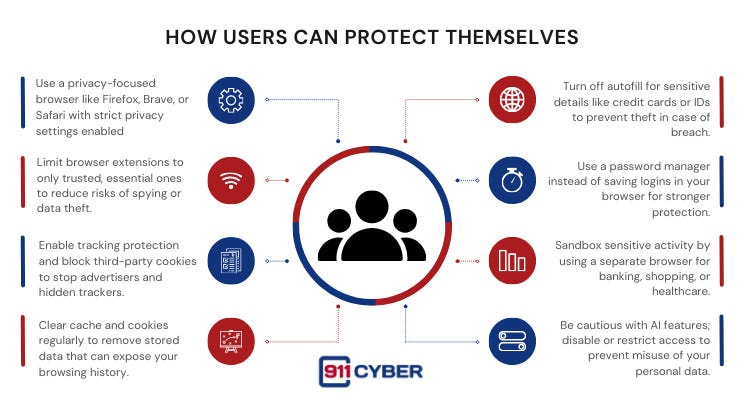
🛡️ How Users Can Protect Themselves
🧰 What Resources Are Available to Help?
📚Books
Cybersecurity for Beginners: 10+ Easy Ways to Hack Proof your Digital Life, Protect Your Privacy, and Browse the Web with Confidence by Thomas Greyson
The Ask Leo! Guide to Staying Safe on the Internet - Expanded 5th Edition: Keep Your Computer, Your Data, And Yourself Safe on the Internet by Leo Notenboom
The Browser Hacker’s Handbook by Wade Alcorn and Michele Orru’
Introduction to Online Safety: A Practical Guide to Cybersecurity by John G. Jacob
🎙️ Podcasts
Episode 111: “ZeuS” by Darknet Diaries hosted by Jack Rhysider
Episode 094: “Rogue browser extensions, Twitter presence, and how to cheat in exams” by Smashing Security
🛠️ Tools
Electronic Frontier Foundation (EFF)’s Privacy Badger – free extension to block trackers → eff.org/privacybadger
Mozilla ’s Privacy & Security Tips → mozilla.org/security
OWASP® Foundation Top 10 Browser Security Risks → owasp.org
DuckDuckGo – extension to block hidden trackers → duckduckgo.com
🧠 Final Thoughts
Your browser may look like a simple tool on the surface, but it has become one of the most powerful and underestimated pieces of technology in your daily life. It knows where you go, what you search for, who you connect with, and often even the personal details you would never share out loud. That makes it both your most convenient assistant and your greatest point of vulnerability.
As the browser wars heat up, with billion-dollar bids, AI-powered features, and companies competing to control the gateway to the internet, the stakes are no longer just about speed or design. They are about ownership of your digital identity and access to your private life.
Practicing good cyber hygiene with your browser is no longer optional. It means being intentional about the tools you use, the settings you enable, and the data you allow to be stored. It means questioning whether convenience is worth the risk and recognizing that privacy is not the default. It is something you have to claim for yourself.
In the end, protecting your browser is protecting yourself. It is the first line of defense in a world where every click is observed and every session is an opportunity for exploitation. Stay aware, stay selective, and remember: how you browse today will shape how safe you are tomorrow.
